Showing posts with label Canvas_conversion. Show all posts

Friday, June 22, 2012

Necessary Reworking

Inevitably, when faculty first hear that we are changing to a new LMS, the response is not delight, but dread. One motivator for that dread is the certain knowledge that the things you had all nicely arranged will need to be reworked.  There is simply no way around it.  I am in the heart of that reworking now and, I'll be honest with you, its painful and annoying.

Stuff I'm reworking:
  • Course Content - I leave content locked until we get to it. In ANGEL I did that by locking down folders. In Canvas, apparently I need to lock down individual items because locking down the module equivalent of the folders did not actually hide or prevent access to the content.  I'm popping regularly into the Student View to see what can be seen.
  • Quiz Questions - In ANGEL, I used quiz banks for all my quizzes. So, I'd have a bank of 20 questions, for example, and only 10 questions would be on the quiz.  My actual quizzes had no questions in them, just a link to the quiz bank. Unfortunately, my ANGEL quiz banks came over as a single bank, all 620 questions.  I am going question by question through the massive bank and moving them into new banks. Incredibly painful.  In future, I would populate my quizzes in ANGEL first, delete the quiz banks and then move them over.
  • ANGEL pages - the ANGEL pages (Add Content > Add Page) came over nicely. However, as far as I can tell, I can't edit them in Canvas.  I'm creating Canvas Pages and copying and pasting the HTML over from ANGEL. 
On the fun side, students are starting to be active in the class, accepting my course invitations,  completing the Pre Class Assignment and taking my pre-class survey, which I'll share with you next week, after it is complete.

I'm leaving for a 2 1/2 day meeting on Sunday, so between now and Sunday morning, I need to complete my course orientation and week 1.  I've got my work cut out for me.  I see some corner cutting in my future.

Also, I am inspired by this great video of Mr. Rodgers. Learning is good. New is good. I'm growing ideas in the garden of my mind. I plan to play this at the start of every Canvas training to get us in the right frame of mind. And when I'm feeling frustrated, I'll take a break and listen to it myself.

Sunday, June 17, 2012

Crunch Time for Global Studies

While I am generally a very calm person, I must admit to feeling slightly panicked at the moment. I really need to send out the student pre class assignment letter today and I am totally not ready.  As I prepare, I'm making notes for you as to what I'm doing.

  • Permission: A couple of weeks ago, I got permission from the eLearning director and my department chair to use Canvas for this class.  Highline isn't moving to Canvas right away, so this will be a bit of a shock for students. Plus, they won't be able to get support from campus or other normal channels, so I had to be sure everyone was ok with that before proceeding. 
  • ANGEL: We're not using ANGEL, but some students might still go there. So I set up my ANGEL classroom by turning off all tabs (except course and manage), deleting all content from the Course page except Announcements and setting up an announcement with visible dates for the whole quarter telling students that our class is in Canvas.
  • Observers: I set up department chair and eLearning director as observers (what can observers see?)
  • Orientation Activity:  I copied and pasted this over into Canvas Pages. I also used the Assignment for the Backup plan and Quizzes for my survey (to do a survey, you add a quiz and choose "ungraded survey").  After adding the content, I organized it in the Modules area.
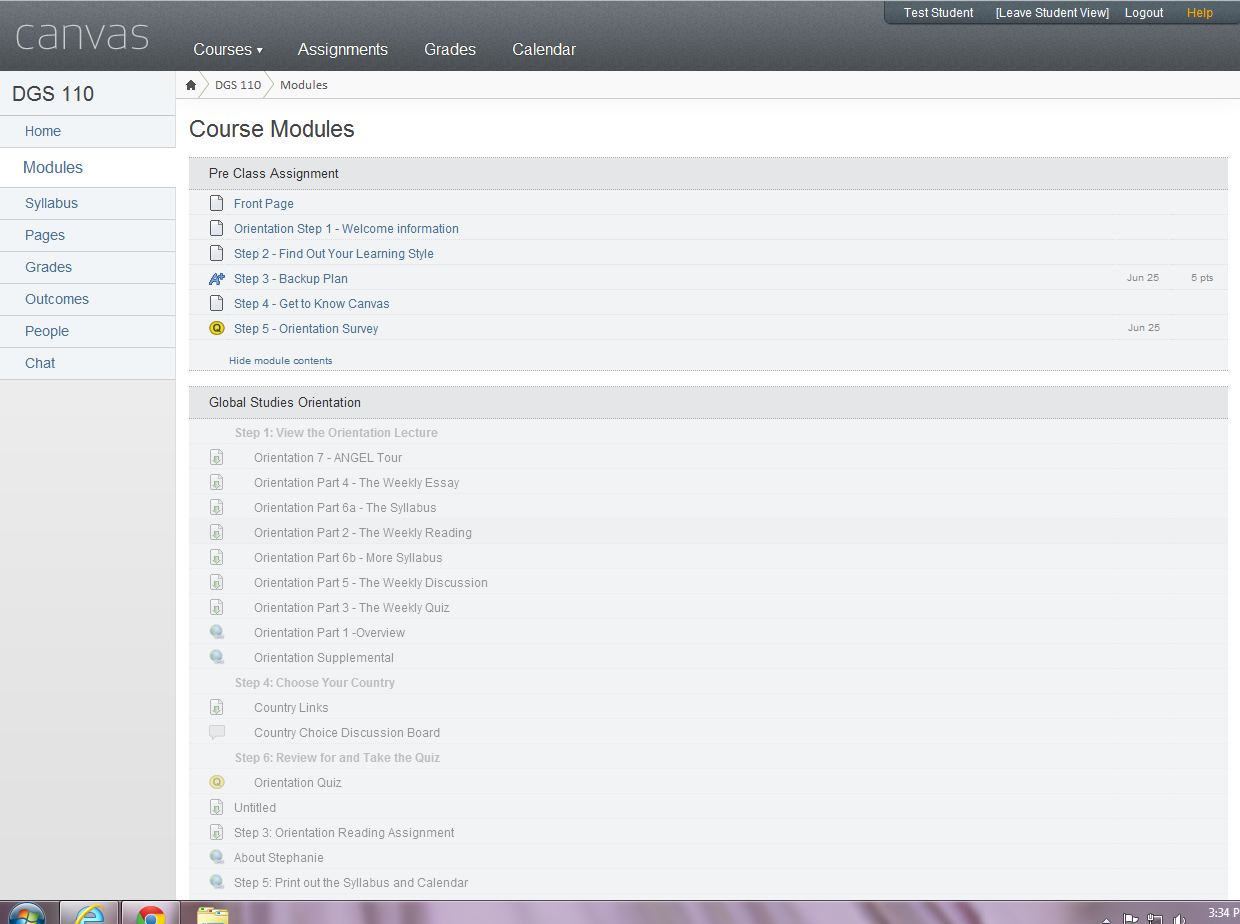
  • Lock Down: this class is still very much under construction. In ANGEL, it is super easy to make the content invisible to students. Canvas is much more open.  As far as I can tell, I can make content inaccessible but not invisible.  I locked down all of the modules except for the Pre Class Assignment and the Syllabus content.  Here is what it looks like:
  • Explanatory videos: I made two (well, it ended up being three) videos explaining how students can log into the class, update their profiles and notifications and do the orientation assignment.  I meant for this to be two videos but I forgot that notifications was a separate step when setting up the profile.  I didn't want to re-record it because I needed to invent a new student email address each time I did the recording so I could walk them through signup.  I also tried to make the initial login video general enough that anyone could use it.
  • Edit the Welcome Letter: I changed up my Welcome Letter to accomodate the change to Canvas and warn the students what was coming.
Phew! I think I'm ready to send the message to students. This all took me about 3 hours - not too bad, considering I didn't really know what I was doing.  The one piece that gave me headaches was trying to find instructions for students.  More on that in a separate post.

Saturday, June 16, 2012

Prepping my class in Canvas

I decided to teach my Summer class in Canvas. I also decided not to do anything with my course space until after the conference. Well, that time is now.  I mentioned in a previous post that the course moved over easily, but that moving over a messy class resulted in a lot of mess in Canvas.  So, I deleted that class, cleaned up my ANGEL class and imported it into a new Canvas classroom.

I had all of my ANGEL content organized in folders and subfolders.  Canvas caught the top level folders but not the lower folders. For example, I had a top level folder called "Weekly Work" and in that folder, I had separate folders for each week.

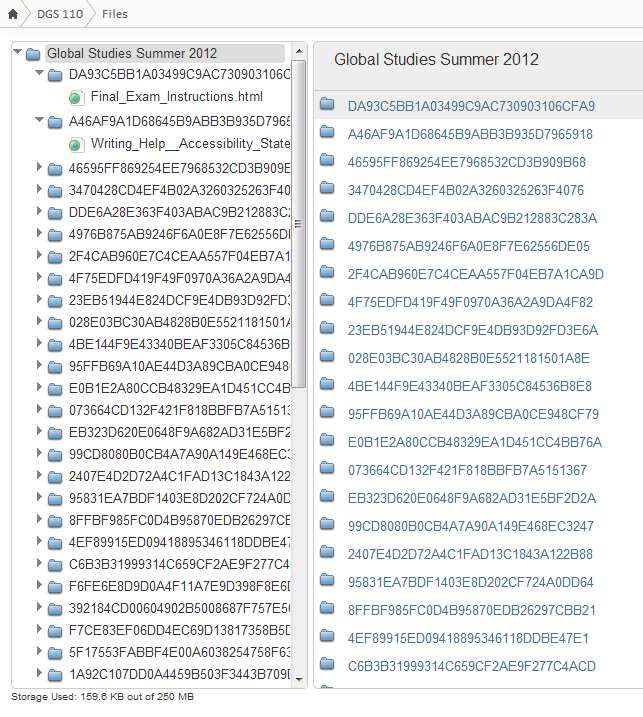
It seems easy enough to create new modules and drag and drop content into the right place. But it seems like that might be time consuming.  I thought instead to go to the Files area to try and organize stuff there.  I realized quickly that doing it in Files wouldn't work because ANGEL gives files giberish names which were carried over into Canvas (so this is really an ANGEL flaw, not a Canvas one).

In my Intro to Canvas session, they talked about the Modules as being the last thing to do, after assignments were created, etc. One would just organize things there, not build there.

I fiddled around looking at other options and I'm thinking the easiest way to go will be to build in the Canvas way and copy and paste from ANGEL rather than work fully with my imported content.  We'll see how this goes. . . .